
अगर आप Gemini se photo banane ka prompt kaise likhe यह जानना चाहते हैं, तो यह गाइड आपके लिए है। Google Gemini की मदद से आप अपनी personal photo को नया look दे सकते हैं, नई AI photo बना सकते हैं, दो photos को एक साथ जोड़ सकते हैं और logo या thumbnail भी तैयार कर सकते हैं। लेकिन अच्छी photo बनाने के लिए सिर्फ Gemini खोलना ही काफी नहीं है, आपको यह भी पता होना चाहिए कि उसमें सही prompt क्या और कैसे लिखना है।
कई बार हम Gemini को बस इतना लिख देते हैं कि “मेरी एक अच्छी photo बना दो”, लेकिन इससे जरूरी नहीं कि हमें वैसा ही result मिले जैसा हमने सोचा था। एक अच्छे prompt में photo का look, कपड़े, background, pose, lighting और दूसरी जरूरी जानकारी साफ तरीके से बतानी होती है। Prompt जितना स्पष्ट होगा, Gemini के लिए आपकी जरूरत समझना उतना ही आसान होगा।
इस गाइड में हम आसान भाषा में समझेंगे कि Gemini se photo banane ka prompt कैसे लिखा जाता है और एक अच्छे AI photo prompt में क्या-क्या शामिल करना चाहिए। साथ ही आपको personal photo, दो photos को एक साथ जोड़ने, logo और thumbnail बनाने के practical examples और कुछ ready-to-use prompts भी मिलेंगे। इससे आप केवल दिए गए prompts को copy-paste करना ही नहीं, बल्कि अपनी जरूरत के हिसाब से खुद भी बेहतर prompt लिखना सीख पाएंगे।
इन prompts को आजमाने के लिए आप Google Gemini का इस्तेमाल कर सकते हैं। आगे हम सबसे पहले समझेंगे कि Gemini में photo बनाने के लिए prompt कैसे काम करता है, फिर step by step अलग-अलग तरह की photos और designs बनाना सीखेंगे।
अगर आप अलग-अलग कैटेगरी के और भी बेहतरीन AI Image Prompts ढूंढ रहे हैं, तो हमारा 50+ AI Image Prompts Copy & Paste संग्रह भी ज़रूर देखें। इसमें Trending Boy, Girl, Couple, Luxury, Travel, Rain Effect, DSLR और Bike Rider जैसे कई प्रीमियम AI Prompts दिए गए हैं, जिन्हें आप सीधे कॉपी करके इस्तेमाल कर सकते हैं। 50+ AI Image Prompts Copy & Paste (2026)
Gemini Se Photo Banane Ka Prompt Kya Hai
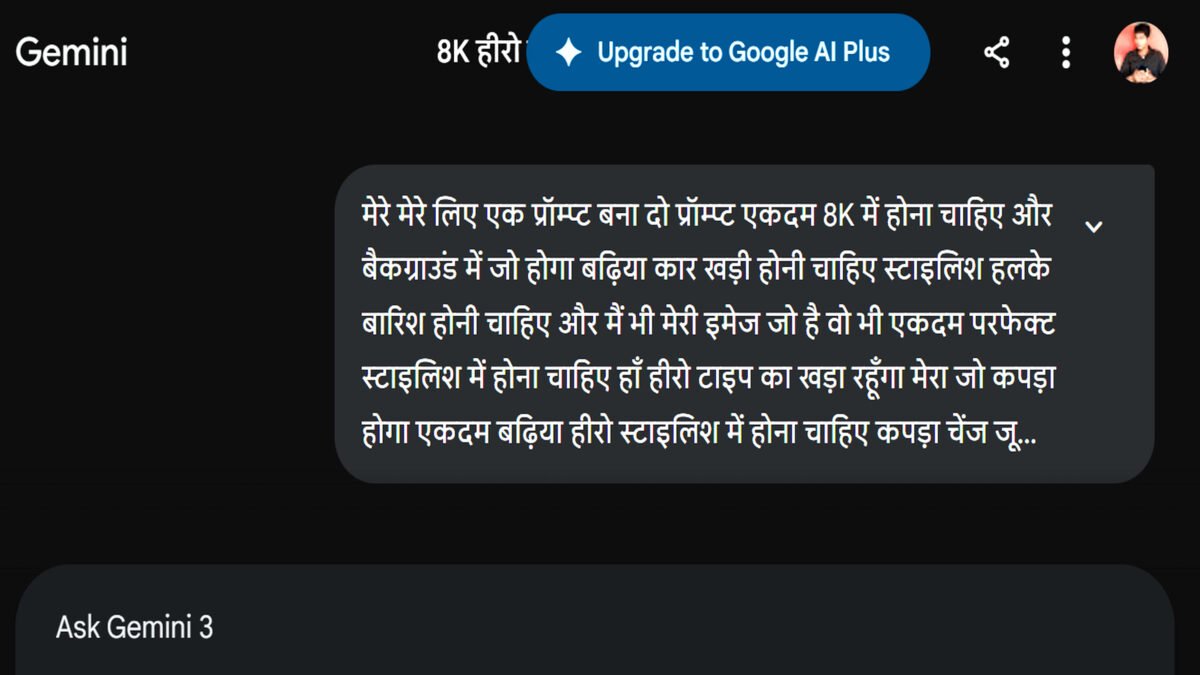
आगे बढ़ने से पहले यह समझना जरूरी है कि प्रॉम्प्ट क्या होता है। जब आपको प्रॉम्प्ट का मतलब समझ आ जाता है, तो अपनी जरूरत के हिसाब से सही प्रॉम्प्ट लिखना भी काफी आसान हो जाता है।
सरल शब्दों में, प्रॉम्प्ट एक निर्देश होता है जिसमें हम Gemini को बताते हैं कि हमें कैसी तस्वीर बनानी है। अगर आप सिर्फ “एक फोटो बना दो” लिखते हैं, तो Gemini को आपकी पूरी जरूरत समझ नहीं आएगी और तस्वीर आपकी सोच के अनुसार नहीं भी बन सकती है।
इसलिए प्रॉम्प्ट में जरूरी जानकारी साफ-साफ लिखनी चाहिए। जैसे तस्वीर का background कैसा हो, कपड़े और pose कैसे हों, lighting कैसी हो, image का style क्या हो और आप अपनी फोटो में क्या बदलाव चाहते हैं। जितनी जरूरी जानकारी आप साफ तरीके से देंगे, Gemini के लिए आपकी जरूरत समझना उतना ही आसान होगा।
यानी आप Gemini को अपनी मनचाही तस्वीर बनाने के लिए जो साफ और विस्तार से निर्देश लिखकर देते हैं, उसे ही प्रॉम्प्ट (Prompt) कहा जाता है।
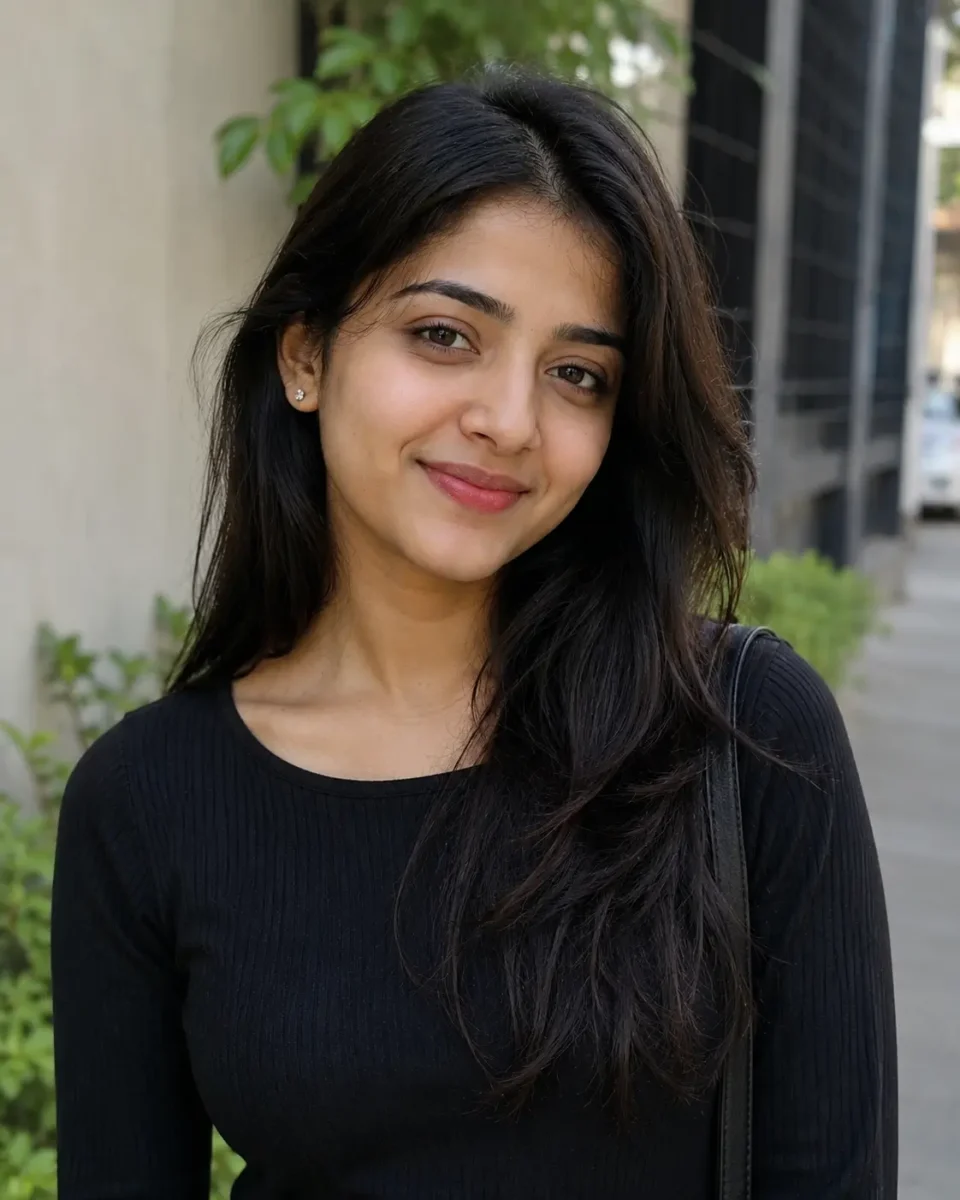
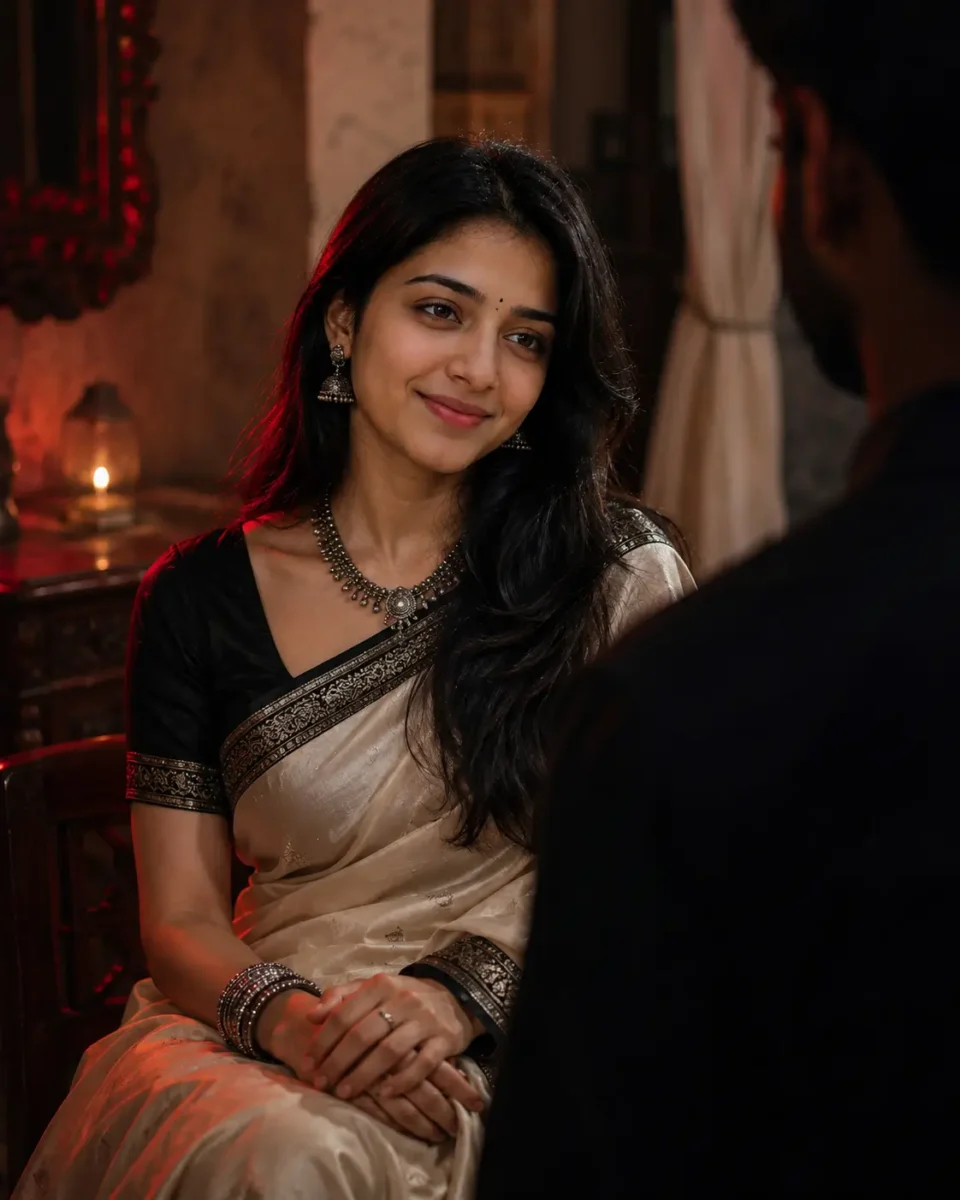
Use the uploaded photo as the visual reference for the woman, keeping her natural facial appearance, skin tone, hairstyle and expression consistent with the reference.Create an ultra-realistic cinematic 4:5 portrait of the woman sitting gracefully inside an elegant heritage-style Indian interior. She is wearing a luxurious deep ivory silk saree with a subtle black and antique-silver border, paired with a sophisticated black blouse. Add tasteful oxidized silver jhumkas, a delicate statement necklace, silver bangles and a tiny black bindi. Her long black hair falls naturally over one shoulder with soft, realistic strands.She sits with her hands gently folded, looking slightly upward toward a man standing close in front of her. Show the man only as a softly blurred dark silhouette in the foreground, creating natural depth and an emotional cinematic moment.Create a rich background with textured walls, elegant wooden details, soft curtains and subtle warm practical lights. Use dramatic low-key lighting with a soft deep-red rim light from one side and warm diffused light falling naturally across her face. Keep realistic skin texture, natural shadows, detailed saree fabric, expressive eyes and true-to-life colors.Professional DSLR photography, 50mm lens look, shallow natural depth of field, realistic facial details, cinematic composition, 4:5 portrait ratio, high-resolution photorealism, no plastic skin, no distorted hands, no artificial CGI look, no text or watermark.
Create an ultra-realistic cinematic portrait of a confident Indian man in his late 20s relaxing inside an elegant modern café. He has naturally styled thick dark hair, a neatly trimmed beard, and wears premium round-frame sunglasses with a sophisticated dark casual outfit.
Photograph the scene from outside the café through a large glass window, giving the image a natural candid street-photography feel. Soft reflections of nearby buildings, trees and daylight should appear naturally across the glass without covering the man’s face.
Warm directional afternoon sunlight falls across one side of his face, revealing realistic skin texture and creating rich highlights with soft deep shadows. Keep the other side naturally darker for a dramatic but believable cinematic look.
Add a softly blurred foreground near the bottom and edges of the frame to create depth, while the café interior remains subtly visible behind him with warm ambient lights, wooden textures and gentle background bokeh.
Professional DSLR photography, 50mm lens look, shallow natural depth of field, realistic skin pores, detailed hair and beard, authentic glass reflections, natural colors, cinematic composition, high-resolution photorealism, no plastic skin, no artificial CGI look, no text or watermark.
Google Gemini Se Photo Banane Ka Prompt Kaise Likhe?
अब तक आप समझ गए होंगे कि प्रॉम्प्ट क्या होता है और अच्छी AI Photo बनाने में इसकी क्या भूमिका है। अब सवाल आता है कि Google Gemini se photo banane ka prompt kaise likhe, ताकि Gemini आपकी बात सही तरीके से समझ सके और आपकी जरूरत के अनुसार तस्वीर बना सके।
इसके लिए हम आगे पूरा तरीका step-by-step समझेंगे। आप जानेंगे कि personal photo बनाने या edit करने, logo तैयार करने और thumbnail बनाने के लिए प्रॉम्प्ट में क्या-क्या लिखना चाहिए। अलग-अलग काम के हिसाब से प्रॉम्प्ट में दी जाने वाली जानकारी भी बदलती है, इसलिए इसे उदाहरण के साथ समझना ज्यादा आसान रहेगा।
साथ ही आपको कुछ ready-made Gemini AI prompts भी मिलेंगे, जिन्हें आप सीधे copy करके आजमा सकते हैं। इन उदाहरणों से आपको यह समझने में भी मदद मिलेगी कि अपनी जरूरत के हिसाब से किसी प्रॉम्प्ट में क्या बदलाव करना है। इसके बाद आप केवल ready-made prompts पर निर्भर रहने के बजाय खुद भी अच्छे प्रॉम्प्ट लिख पाएंगे।
Gemini Se Personal Photo Banane Ka Best Prompt Kaise Likhe
Step 1: Personal Photo Ke Liye Gemini Ko Kya Likhe
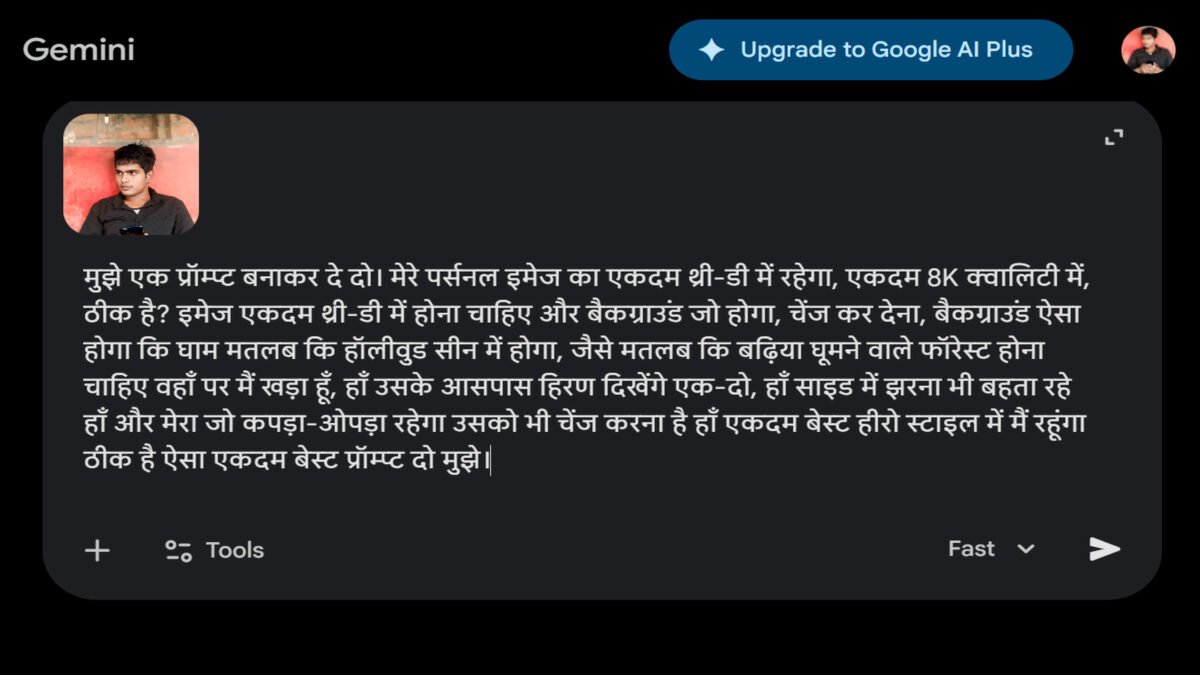
सबसे पहले हम समझते हैं कि अपनी personal photo के लिए Gemini से सही prompt कैसे बनवाएं। इसके लिए आपको Gemini को साफ-साफ बताना होगा कि आप अपनी फोटो में किस तरह का बदलाव चाहते हैं और final photo कैसी दिखनी चाहिए। जितनी साफ जानकारी देंगे, Gemini के लिए आपकी जरूरत के हिसाब से prompt तैयार करना उतना ही आसान होगा।
आप background, कपड़े, hairstyle, pose, lighting और photo का overall look बता सकते हैं। इसके अलावा आप यह भी लिख सकते हैं कि photo cinematic, stylish, professional या बिल्कुल natural दिखनी चाहिए। अगर आपके मन में कोई खास location या scene है, तो उसकी जानकारी भी दे सकते हैं।
इन details के आधार पर Gemini आपके लिए एक ready-to-use photo prompt तैयार कर सकता है। इसके बाद उस prompt को जरूरत के हिसाब से थोड़ा बदलकर अपनी photo के साथ इस्तेमाल किया जा सकता है। आगे हम इसे step-by-step करके समझते हैं।
Step 2: Gemini aapke liye prompt generate karega
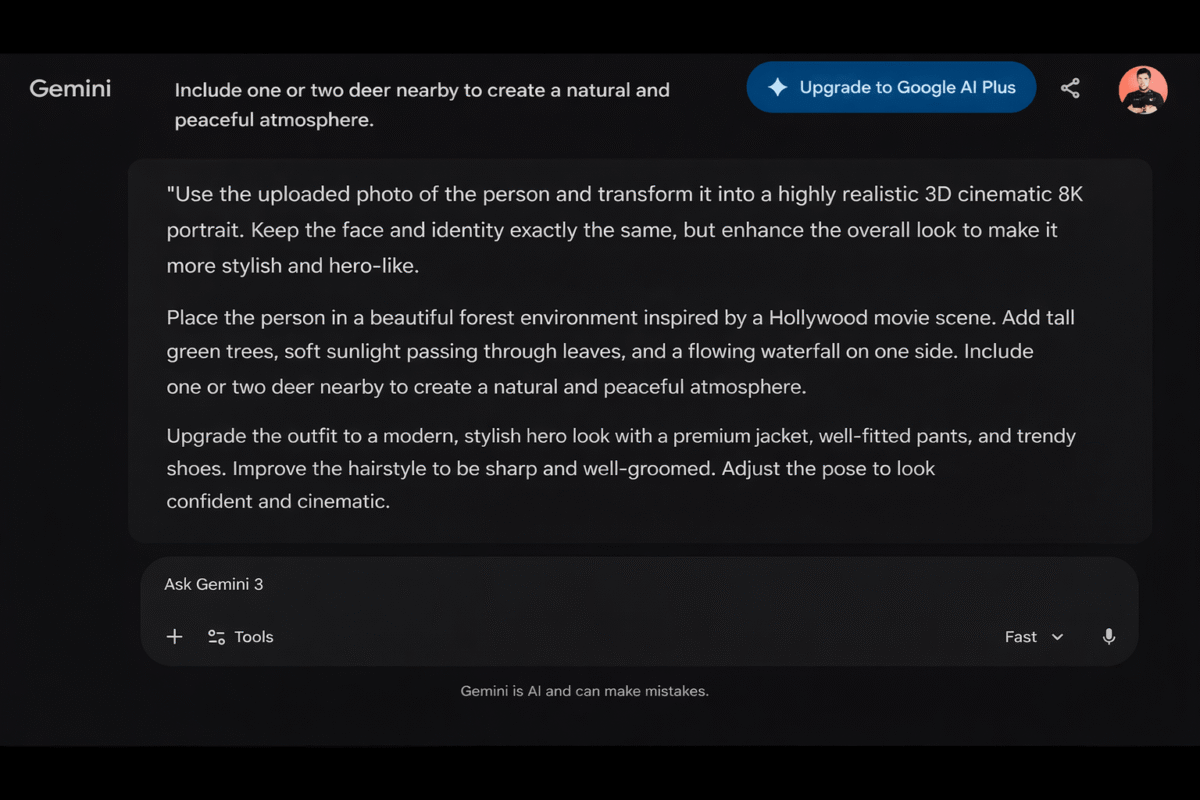
जैसे ही आप अपनी जरूरत की पूरी जानकारी लिखकर Send करते हैं, Gemini उसके आधार पर आपके लिए एक ready-to-use prompt तैयार कर देता है। अगर Gemini एक से ज्यादा prompts देता है, तो आप अपनी पसंद के अनुसार उनमें से किसी एक को चुन सकते हैं। इसके बाद prompt को copy करें और जरूरत हो तो उसमें थोड़ा बदलाव करके अपनी photo बनाने के लिए इस्तेमाल करें।
नीचे हमने ऐसा ही एक ready-made prompt दिया है, जिसकी मदद से आप अपनी real photo को ज्यादा stylish, cinematic और professional look देने की कोशिश कर सकते हैं। आप इसमें background, कपड़े, pose, lighting और दूसरी details अपनी पसंद के अनुसार बदल सकते हैं। इससे एक ही prompt को अलग-अलग तरह की photos के लिए भी इस्तेमाल किया जा सकता है।
Generate an ultra-realistic professional DSLR photograph using the uploaded person as the main subject. Preserve his recognizable facial appearance, facial structure, skin tone, age, eyes, nose, lips and jawline. Add very subtle, naturally grown facial stubble with fine irregular hairs around the upper lip, chin and jawline, softly blended with realistic skin pores. Keep the hairstyle close to the reference, naturally neat with detailed individual hair strands.
Place him in a lush realistic forest with tall green trees, dense foliage, moss-covered rocks and a beautiful flowing waterfall on one side. Add one or two deer naturally in the distant background. Soft late-afternoon sunlight filters through the trees, creating natural sun rays, gentle facial highlights, realistic shadows and atmospheric depth.
Dress him in a premium dark olive-brown jacket over a fitted black T-shirt, tailored black pants and modern dark sneakers. Pose him confidently but casually on a moss-covered rock near the waterfall, body slightly angled, shoulders relaxed, hands naturally positioned and a calm cinematic expression.
Capture with a professional full-frame DSLR, 50mm lens, f/2.8, eye-level perspective, natural depth of field and tack-sharp focus on the face and eyes. Show realistic skin pores, beard hairs, hair strands, fabric texture, accurate hands and natural body proportions. Use balanced HDR, realistic colors, natural contrast and premium high-resolution photographic clarity. The final image must look like a genuine professional outdoor photograph, not AI artwork or a 3D render. No blurry face, fake beard, plastic skin, distorted anatomy, malformed hands, extra fingers, oversmoothing, CGI look, text, logo, watermark or obvious AI artifacts.
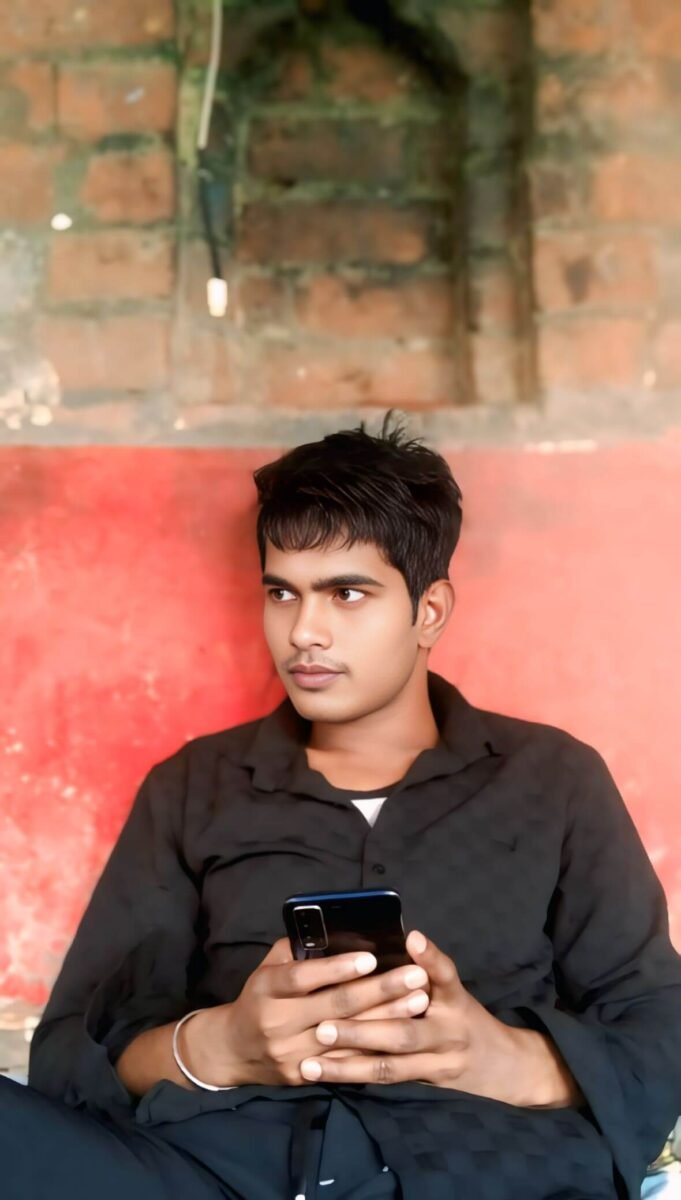
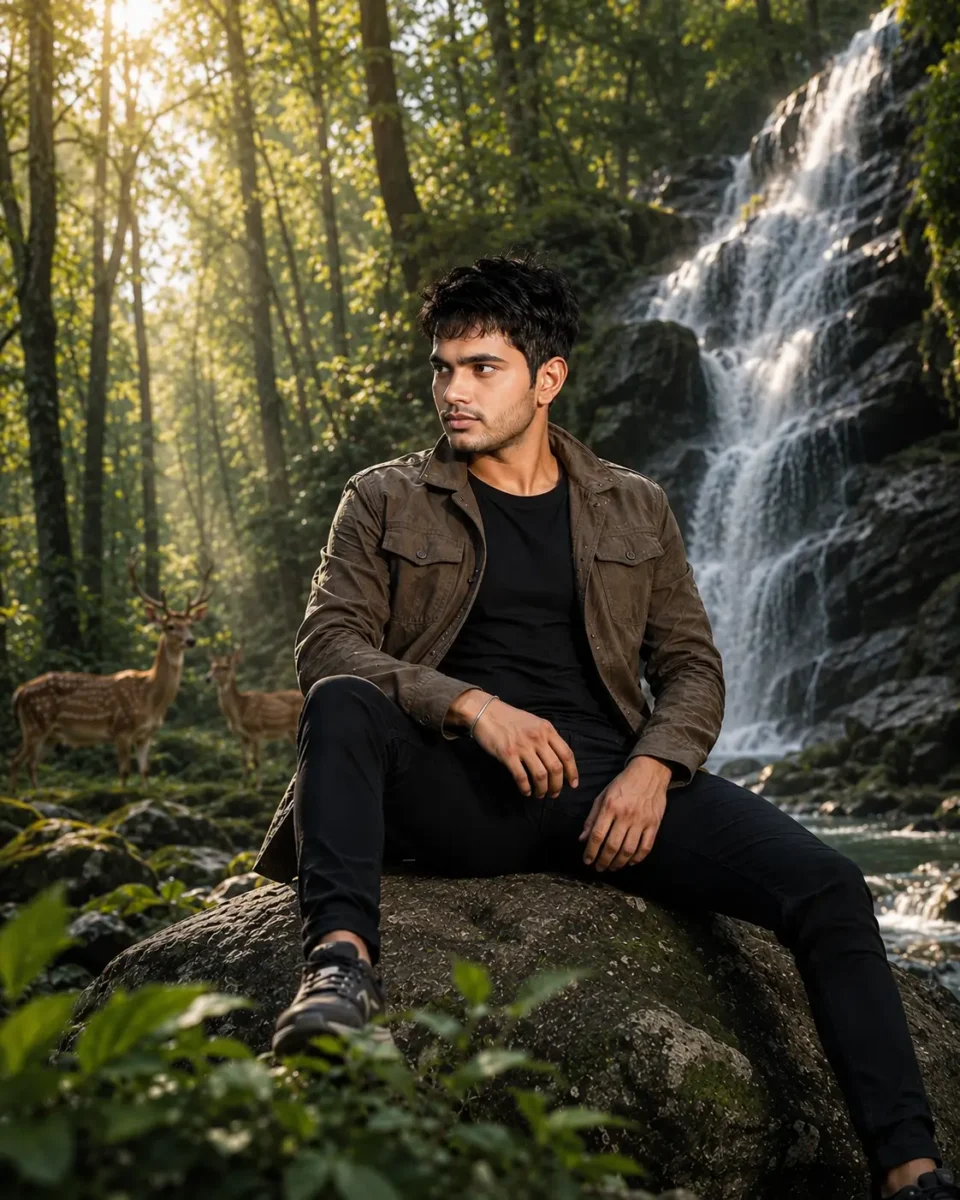
अगर आप अपनी साधारण फोटो को एकदम cinematic और professional AI लुक देना चाहते हैं, तो Gemini से prompt बनाकर उसे दूसरे AI tools में कैसे इस्तेमाल करना है, इसकी पूरी step-by-step जानकारी हमारी इस guide में दी गई है। इसे जरूर पढ़ें और खुद भी शानदार रिज़ल्ट पाएं।
2 .Gemini Se Do Photos Ko Ek Frame Me Jodne Ka Prompt Kaise Likhen?
Google Gemini की मदद से दो photos को एक ही frame में जोड़ना काफी आसान है, लेकिन इसके लिए prompt में सही जानकारी देना जरूरी है। अगर prompt साफ नहीं होगा, तो दोनों लोगों का चेहरा बदल सकता है, उनकी position गलत हो सकती है या final image देखने में natural नहीं लगेगी।
इसलिए Gemini को यह साफ बताना चाहिए कि दोनों photos को किस तरह जोड़ना है, कौन किस तरफ रहेगा, background कैसा चाहिए और final photo का look कैसा होना चाहिए। सही details देने पर दोनों photos को एक ही scene में ज्यादा natural और realistic तरीके से दिखाया जा सकता है।
अब हम step-by-step समझते हैं कि Gemini se do photos ko ek frame me jodne ka prompt kaise likhen और उसे अपनी photos के साथ कैसे इस्तेमाल करें।
Step 1: Sabse Pehle Google Gemini Open Kare
सबसे पहले अपने मोबाइल या कंप्यूटर में Google Gemini खोलें। इसके लिए आप ब्राउज़र में Gemini सर्च कर सकते हैं या मोबाइल में Gemini ऐप का इस्तेमाल कर सकते हैं। Gemini खुलने के बाद नीचे आपको prompt लिखने का box दिखाई देगा, जहाँ से हम दो photos को एक frame में जोड़ने की प्रक्रिया शुरू करेंगे।
Step 2: Photo Merge ke Liye Gemini ko Kya Likhen (Sahi Prompt Words)
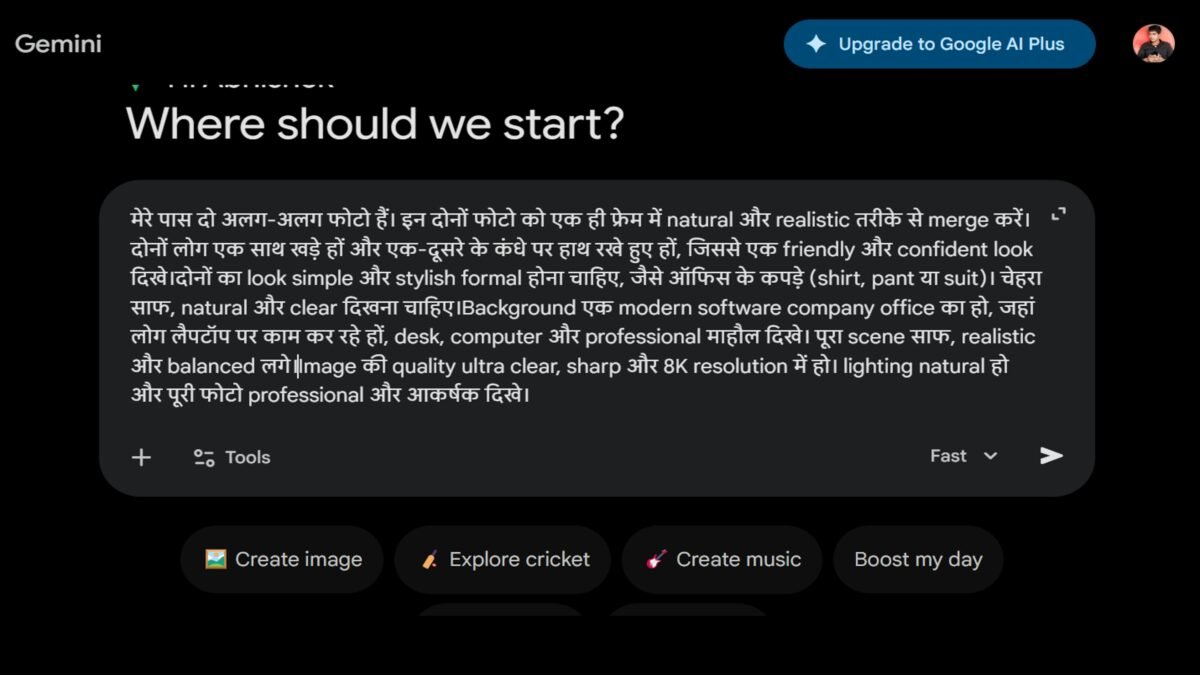
अब Gemini के prompt box में साफ शब्दों में बताएं कि आप दोनों photos को किस तरह एक frame में जोड़ना चाहते हैं। उदाहरण के लिए आप लिख सकते हैं, “मेरे पास दो अलग-अलग photos हैं। दोनों को एक ही frame में natural तरीके से जोड़ने के लिए एक detailed prompt बनाओ। दोनों लोगों का चेहरा natural रहे, lighting और background एक जैसा लगे और final photo realistic तथा professional दिखे।”
आप final image में जैसा result चाहते हैं, उसकी जरूरी details भी यहीं बता सकते हैं। जैसे दोनों लोगों की position, कपड़े, pose, background, lighting और photo का style कैसा होना चाहिए। जितनी साफ जानकारी देंगे, Gemini के लिए आपकी जरूरत के अनुसार सही prompt तैयार करना उतना ही आसान होगा।
Step 3: Google Gemini se Prompt Generate Kare
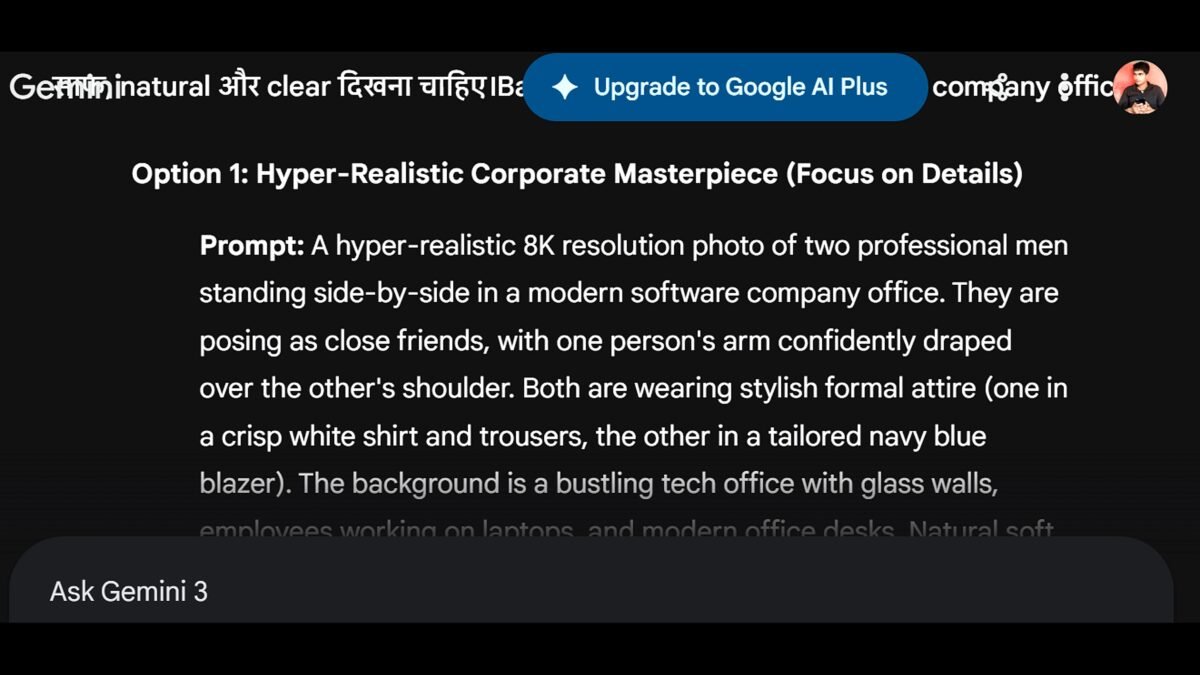
अब आपने अपनी जरूरत के अनुसार जो जानकारी लिखी है, उसे Send कर दें। Gemini आपकी दी गई details के आधार पर एक ready-to-use prompt तैयार कर देगा। अगर आपको लगे कि prompt में कोई जरूरी चीज छूट गई है, तो आप उसी समय Gemini को बताकर उसमें बदलाव भी करवा सकते हैं।
Prompt तैयार होने के बाद उसे Copy कर लें। अगले step में इसी prompt के साथ अपनी दोनों photos upload करनी हैं, ताकि Gemini उन्हें एक ही frame में जोड़कर नई image तैयार कर सके।
Step 4: 2 Photos Upload Kare aur Prompt Run Kare (Gemini)
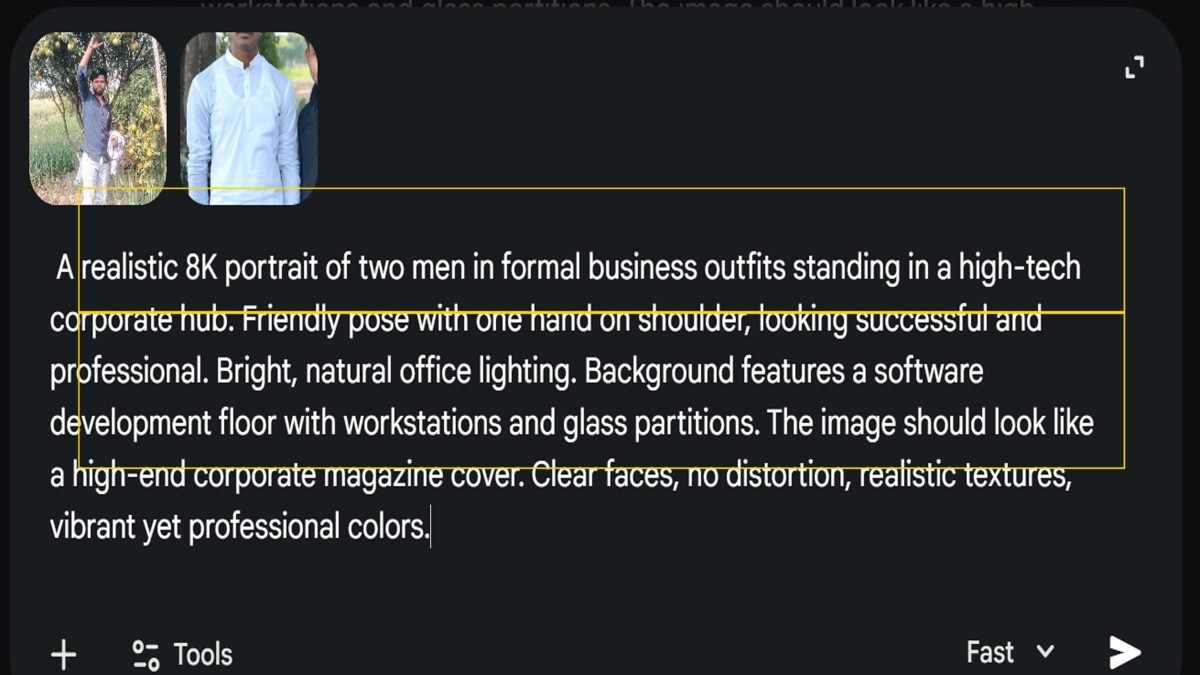
जैसे ही Gemini आपके लिए prompt तैयार कर दे, उन दोनों photos को select करके upload करें जिन्हें आप एक ही frame में जोड़ना चाहते हैं। Photos upload होने के बाद तैयार किए गए prompt को साथ में रखें और Send बटन पर क्लिक कर दें। इसके बाद Gemini आपकी photos और prompt में दी गई जानकारी के आधार पर नई image तैयार करना शुरू करेगा।
Image बनने के बाद उसे ध्यान से देखें कि दोनों लोगों के चेहरे, position, background और lighting natural लग रहे हैं या नहीं। अगर कोई चीज सही न लगे, तो prompt में उसी बदलाव को साफ-साफ लिखकर दोबारा image बना सकते हैं। इस तरह थोड़े बदलाव के साथ आपको अपनी पसंद के ज्यादा करीब result मिल सकता है।
Step 5: AI Aapki Final Image Automatically Generate kar dega
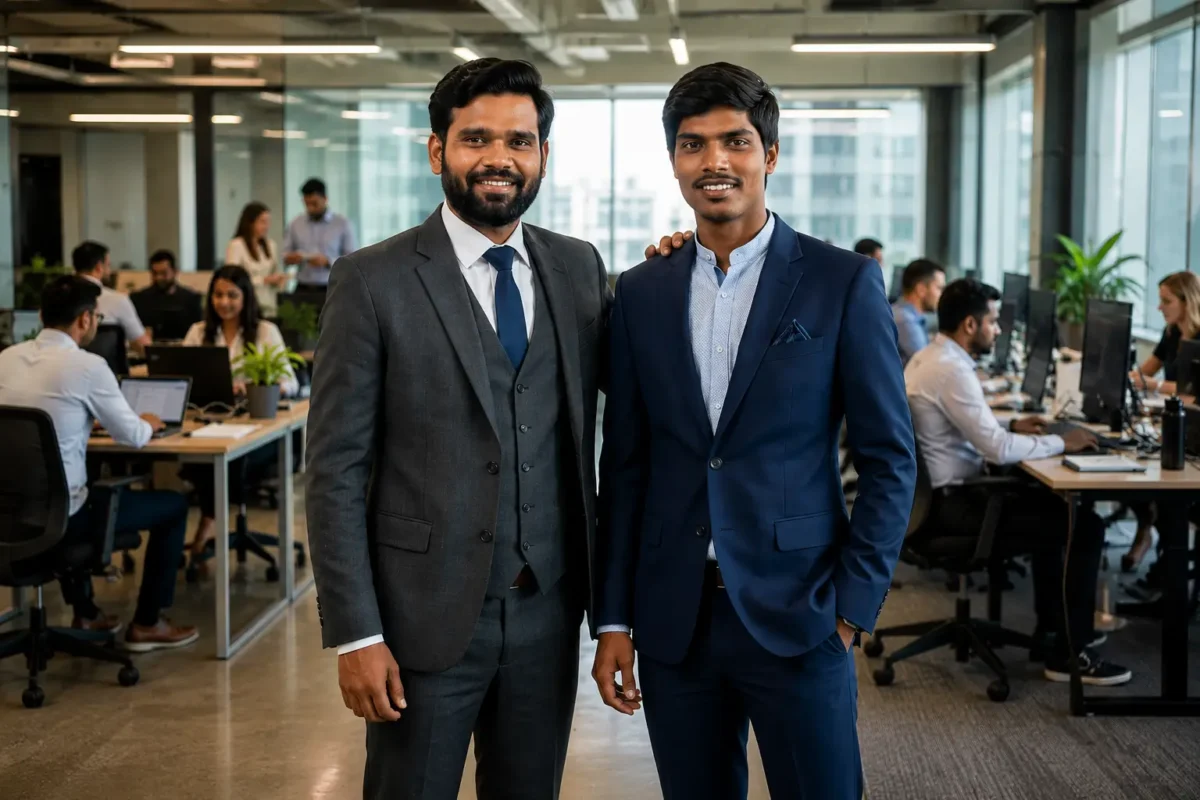
जैसे ही आप अपनी दोनों photos और तैयार prompt को Send करते हैं, Gemini उन्हें process करके एक नई merged image तैयार कर देता है। अगर prompt में दोनों लोगों की position, background, lighting और style जैसी details साफ दी गई हैं, तो final image ज्यादा natural और realistic दिख सकती है। Image बनने के बाद चेहरे और बाकी details को ध्यान से जरूर देखें।
अगर पहली बार में result आपकी पसंद के अनुसार न आए, तो नया prompt लिखने की जरूरत नहीं है। उसी prompt में जरूरी बदलाव कर सकते हैं, जैसे background बदलना, pose ठीक करना, कपड़े बदलना या lighting को बेहतर करना। इसके बाद updated prompt को दोबारा Send करके नई image बना सकते हैं।
इस तरह एक ही prompt को अपनी जरूरत के अनुसार edit करके अलग-अलग styles में photos तैयार की जा सकती हैं। एक बार यह तरीका समझ आने के बाद Gemini में दो photos को एक frame में जोड़ना काफी आसान हो जाता है।
नीचे दिए गए prompts को आप सीधे copy करके Google Gemini में इस्तेमाल कर सकते हैं।आप चाहें तो अपनी जरूरत के हिसाब से थोड़ा बदलाव भी कर सकते हैं।
और ज्यादा prompts के लिए हमारा ब्लॉग जरूर देखें।
2 Photos ko Ek Frame me Merge Karne ka Best Gemini Prompt
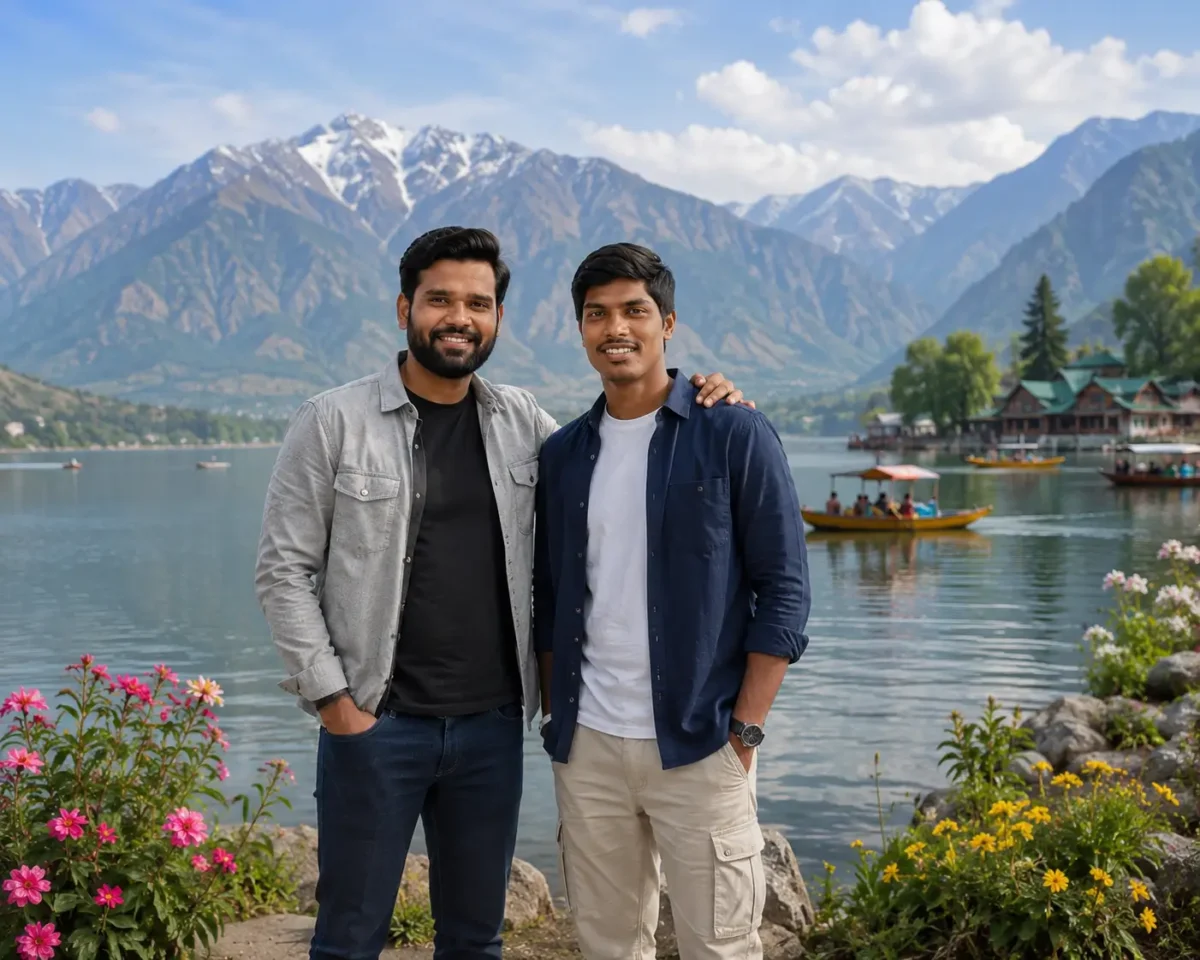
Generate an ultra-realistic professional DSLR photograph combining the two uploaded people naturally into one frame, preserving both faces, skin tones, hairstyles, ages, and recognizable facial features with high consistency. Show them as two close friends standing comfortably together beside a beautiful mountain lake, facing the camera with relaxed natural smiles; one friend rests an arm casually on the other’s shoulder. Give them different stylish casual outfits: one wearing a light grey overshirt over a black T-shirt with dark jeans and sneakers, the other wearing a deep navy overshirt over a white T-shirt with beige trousers and modern sneakers.
Create a breathtaking but realistic background with a calm blue lake, majestic green and rocky mountains surrounding the water, distant snow-touched peaks, a few small wooden boats naturally floating on the lake, and colorful wildflowers along the lakeside foreground. Use a bright clear daytime atmosphere with soft natural sunlight, realistic reflections on the water, gentle facial highlights, balanced shadows, blue sky and light natural clouds.
Capture with a full-frame DSLR, 35mm lens, f/4, eye-level composition, natural depth of field, tack-sharp faces and enough background detail to showcase the scenery. Keep realistic skin pores, individual hair strands, accurate hands, natural body proportions, detailed clothing textures and true-to-life colors. Premium ultra-clear 16K photographic detail, HDR, natural sharpness, 4:5 aspect ratio. No blurry faces, face distortion, plastic skin, malformed hands, extra fingers, duplicate people, oversaturation, fake scenery, CGI look, text, logo, watermark or obvious AI artifacts.
Use the two uploaded photos as separate face references. Create one ultra-realistic photograph featuring both people together naturally in the same frame.
Preserve the recognizable facial identity of BOTH uploaded people as closely as possible. Keep their original face shape, eyes, eyebrows, nose, lips, jawline, skin tone, hairstyle, facial hair, and other distinctive facial features consistent with their respective reference photos.
Do not mix, swap, merge, or blend their faces. Person 1 must match the first uploaded photo, and Person 2 must match the second uploaded photo.
CONCEPT:

Create a stylish but natural lifestyle portrait of the two people as close friends spending time together in a beautiful modern outdoor location.
The photograph should look like a genuine picture taken during a casual day out rather than two separately generated people placed together.
POSE AND INTERACTION:

Position both friends standing comfortably side by side with a small natural distance between them.
Let one person stand slightly angled toward the other while both look naturally toward the camera with relaxed, friendly smiles.
One friend may casually place an arm around the other person’s shoulder to create a believable friendship moment.
Keep their body language relaxed and natural rather than using formal or stiff poses.
OUTFITS:

Give both people different but coordinated smart-casual outfits.
Person 1 wears a clean solid-color casual shirt or premium polo T-shirt with dark jeans and clean sneakers.
Person 2 wears a stylish lightweight overshirt or casual jacket over a plain T-shirt, paired with well-fitted jeans or chinos and casual sneakers.
Keep the clothing modern, simple, youthful, and realistic. Do not make their outfits identical.
LOCATION:

Place both friends in a beautiful modern city garden during late afternoon.
Show a clean landscaped walking path, fresh green trees, trimmed plants, subtle flower beds, modern outdoor seating, and hints of elegant cafés or contemporary city architecture softly visible in the distance.
The location should feel premium, peaceful, clean, and realistic without looking overly luxurious or artificial.
LIGHTING:

Use soft late-afternoon natural sunlight with gentle golden highlights falling across both faces.
Create realistic facial shadows, subtle rim light around the hair and shoulders, natural skin tones, and balanced exposure.
Keep the lighting direction identical on both people so they genuinely appear to have been photographed together at the same location.
BACKGROUND AND DEPTH:

Keep nearby greenery naturally detailed while gradually blurring the distant garden and city elements.
Use realistic optical depth of field and soft creamy bokeh without making the background excessively blurred.
FACE AND SKIN DETAIL:

Maintain realistic skin pores, natural facial texture, subtle imperfections, detailed eyes, individual hair strands, and accurate skin tones for both people.
Do not apply excessive beauty filters or artificial skin smoothing.
PHOTOGRAPHY STYLE:

Professional lifestyle photography, full-frame DSLR aesthetic, 50mm prime lens look, natural perspective, sharp facial focus on both people, realistic optical bokeh, detailed clothing textures, individual hair strands, balanced dynamic range, natural cinematic color grading, photorealistic, ultra-detailed, high-resolution 4K appearance.
IMPORTANT:

Both uploaded people must remain individually recognizable.
Maintain realistic height differences, body proportions, hands, fingers, shoulders, clothing folds, shadows, perspective, and natural interaction between both friends.
Make sure both people share the same lighting, camera perspective, image sharpness, and environmental reflections so neither person looks digitally pasted into the photograph.
Avoid face swapping, mixed …
Do Photo Ko Ek Sath Jodne Ke Liye Gemini Prompt
Generate an ultra-realistic professional DSLR photograph by naturally combining both subjects from the two uploaded reference images into one seamless frame. Preserve each person’s recognizable facial appearance, facial structure, skin tone, age, hairstyle, and important facial features with high consistency. Position them standing confidently side by side with relaxed, natural expressions and realistic body proportions.
Dress both subjects in different premium modern designer outfits with a sophisticated superstar-inspired look, using realistic fabric textures, folds, stitching, and natural fit. Place them inside a luxurious minimalist villa featuring elegant neutral interiors, floor-to-ceiling windows, tasteful indoor plants, premium furniture, soft textured walls, and subtle architectural details. Let warm natural sunlight enter through the windows, creating realistic facial highlights, soft shadows, and perfectly matched lighting between both subjects and the environment.
Capture with a professional full-frame DSLR, 50mm lens, natural depth of field, sharp focus on both faces, realistic skin pores, individual hair strands, accurate hands and fingers, natural colors, and premium high-resolution photographic detail. The final image must look like a genuine luxury lifestyle photograph, not an AI composite. No blurry faces, plastic skin, distorted anatomy, malformed hands, extra fingers, mismatched lighting, fake background, CGI look, text, logo, watermark, or obvious AI artifacts.
Generate an ultra-realistic professional DSLR photograph of two young man traveling together, standing side by side with confident natural smiles and relaxed formal-style poses. Dress them in different elegant modern outfits with realistic fabric textures, and keep natural skin pores, detailed hair strands, accurate hands and realistic body proportions.
Place them on a beautiful rain-soaked oceanfront street at night with light rain and subtle fog. Create a rich background featuring the ocean, colorful flowers along the promenade, tasteful neon lights, distant city lights, and realistic reflections across the wet pavement. Add natural water droplets on their hair and clothing with soft atmospheric lighting and cinematic depth.
Capture with a professional full-frame DSLR, wide-angle 35mm lens, natural depth of field, sharp focus on both faces, realistic colors and premium 16K-level photographic detail. Keep the background softly focused without losing important scenery. No blur, distorted faces, extra or missing fingers, malformed hands, plastic skin, unnatural proportions, CGI look, text, logo, watermark or obvious AI artifacts.
2 Photo in One Frame Prompt Gemini AI
Generate an ultra-realistic professional DSLR photograph by seamlessly bringing both people from the uploaded reference photos into one frame, preserving each person’s recognizable facial appearance, natural skin tone, hairstyle, age, and key facial features with high consistency. Show them walking confidently side by side through the entrance hall of a magnificent luxury mansion, with relaxed hero-like expressions and natural body movement.
Dress them in two distinctly different high-fashion looks: one in a sophisticated black bandhgala suit with subtle embroidered detailing, and the other in an elegant deep-wine formal suit with a premium ivory shirt. Create a grand mansion interior with polished marble floors, a sweeping staircase, tall decorative pillars, crystal chandeliers, luxurious furniture, and tasteful architectural details.
Use warm cinematic chandelier lighting mixed with soft natural light entering from large windows, producing realistic skin illumination, floor reflections, dimensional shadows, and natural depth. Capture from a slightly low cinematic angle with a full-frame DSLR, 35mm lens, sharp facial focus, realistic skin pores, detailed hair and fabric, accurate hands, natural anatomy, and premium 4K photorealistic clarity. The result should feel like a genuine luxury editorial photoshoot, not an AI composite. No blurry faces, altered facial features, plastic skin, malformed hands, extra fingers, distorted bodies, fake reflections, CGI look, text, logo, watermark, or obvious AI artifacts.
Generate an ultra-realistic professional DSLR photograph of two men standing together on a stylish rooftop terrace of a modern technology company, posing like close friends with relaxed smiles and one arm naturally resting around each other’s shoulders. Dress them in different smart-casual outfits: one in a crisp light-blue rolled-sleeve shirt with charcoal chinos, the other in a premium white textured shirt with beige chinos and a minimal wristwatch.
Create a fresh corporate-city atmosphere with glass office architecture, subtle greenery, outdoor seating, and a softly blurred skyline in the background. Use soft golden-hour daylight with realistic facial highlights, natural shadows, and warm reflections on the glass. Capture with a full-frame DSLR, 35mm lens, eye-level framing, natural depth of field, tack-sharp faces, realistic skin pores, detailed hair and fabric, accurate hands, and balanced professional color grading. Premium 8K photorealistic clarity, natural anatomy and true-to-life colors. No blurry faces, plastic skin, distorted hands, extra fingers, unnatural proportions, CGI look, text, logo, watermark, or obvious AI artifacts.
3 Photos ko Ek Frame me Merge Karne ka Gemini Prompt
Generate an ultra-realistic professional DSLR photograph seamlessly combining the three people from the uploaded reference photos into one majestic royal portrait, preserving each person’s recognizable facial appearance, skin tone, age, hairstyle, and key facial features with high consistency. Position them confidently on the broad steps of an opulent royal palace, with the central person standing slightly forward and the other two naturally positioned on either side, creating a powerful but balanced group composition.
Dress each person in a different luxurious Indian royal outfit featuring richly woven silk, velvet, fine gold embroidery, handcrafted buttons, elegant shawls, and tasteful royal accessories in deep emerald, ivory-gold, and royal maroon tones. Create a magnificent palace setting with carved stone arches, tall pillars, grand staircases, glowing chandeliers, antique lamps, polished marble flooring, and subtle golden architectural details.
Use warm cinematic palace lighting with soft directional highlights, realistic facial illumination, natural shadows, gentle floor reflections, and atmospheric depth. Capture with a full-frame DSLR, 50mm lens, slightly low eye-level framing, sharp focus on all three faces, realistic skin pores, detailed hair and embroidery, accurate hands, natural anatomy, and premium 4K photorealistic clarity. The final result should resemble an authentic luxury royal editorial photoshoot rather than an AI composite. No blurry or altered faces, plastic skin, malformed hands, extra fingers or limbs, duplicate people, distorted anatomy, excessive gold, fake reflections, CGI look, text, logo, watermark, or obvious AI artifacts.
Generate an ultra-realistic professional DSLR photograph seamlessly combining the three people from the uploaded reference photos into one frame, preserving each person’s recognizable facial appearance, natural skin tone, hairstyle, age, and key facial features with high consistency. Show them walking confidently together through the open courtyard of a luxurious modern mansion, with relaxed hero-like expressions and natural body movement.
Dress each person in a distinctly different premium high-fashion look: one in an elegant ivory bandhgala with subtle embroidery, the second in a tailored midnight-blue formal suit, and the third in a sophisticated deep-black Indo-Western suit with refined detailing. Keep realistic fabric textures, folds, stitching, and natural fit.
Create a breathtaking luxury mansion setting with tall stone arches, polished marble flooring, landscaped greenery, a reflecting pool, premium outdoor decor, and large glass doors revealing a softly lit interior. Use soft late-afternoon sunlight mixed with warm architectural lighting, producing realistic facial highlights, natural shadows, subtle marble reflections, and cinematic depth.
Capture with a full-frame DSLR, 35mm lens, slightly low cinematic angle, sharp focus on all three faces, natural depth of field, realistic skin pores, individual hair strands, accurate hands and anatomy, and premium Ultra HD 4K photographic clarity. The result must look like a genuine luxury fashion photoshoot, not an AI composite. No blurry or altered faces, plastic skin, malformed hands, extra fingers or limbs, duplicate people, unnatural proportions, mismatched lighting, fake reflections, CGI look, text, logo, watermark, or obvious AI artifacts.
Generate an ultra-realistic professional DSLR photograph seamlessly combining the three people from the uploaded reference photos into one premium lifestyle frame, preserving each person’s recognizable facial appearance, natural skin tone, hairstyle, age, and key facial features with high consistency. Show them standing confidently together on an exclusive rooftop lounge overlooking a modern city skyline, with relaxed expressions and natural body language.
Give each person a distinct luxury look: one in a tailored charcoal designer suit with a black shirt, the second in a sophisticated beige blazer with dark trousers, and the third in a premium black smart-casual outfit. Add tasteful accessories such as elegant watches and subtle sunglasses while keeping the styling realistic and refined.
Create a high-end rooftop setting with glass railings, premium lounge furniture, subtle greenery, and illuminated skyscrapers stretching into the background. Use soft blue-hour evening light mixed with warm rooftop lighting, creating realistic facial highlights, natural shadows, glass reflections, and cinematic city bokeh.
Capture with a full-frame DSLR, 50mm lens, natural depth of field, sharp focus on all three faces, realistic skin pores, detailed hair and clothing, accurate hands, natural anatomy, and premium 4K photographic clarity. The result must look like a genuine luxury lifestyle photoshoot, not an AI composite. No blurry or altered faces, plastic skin, malformed hands, extra fingers or limbs, duplicate people, mismatched lighting, distorted bodies, CGI look, text, logo, watermark, or obvious AI artifacts.
Gemini se Logo Banane ka Prompt Kaise Likhen (Step-by-Step Guide)
Step 1:Logo ke Liye Gemini ko Kya Likhen (Sahi Prompt Words)
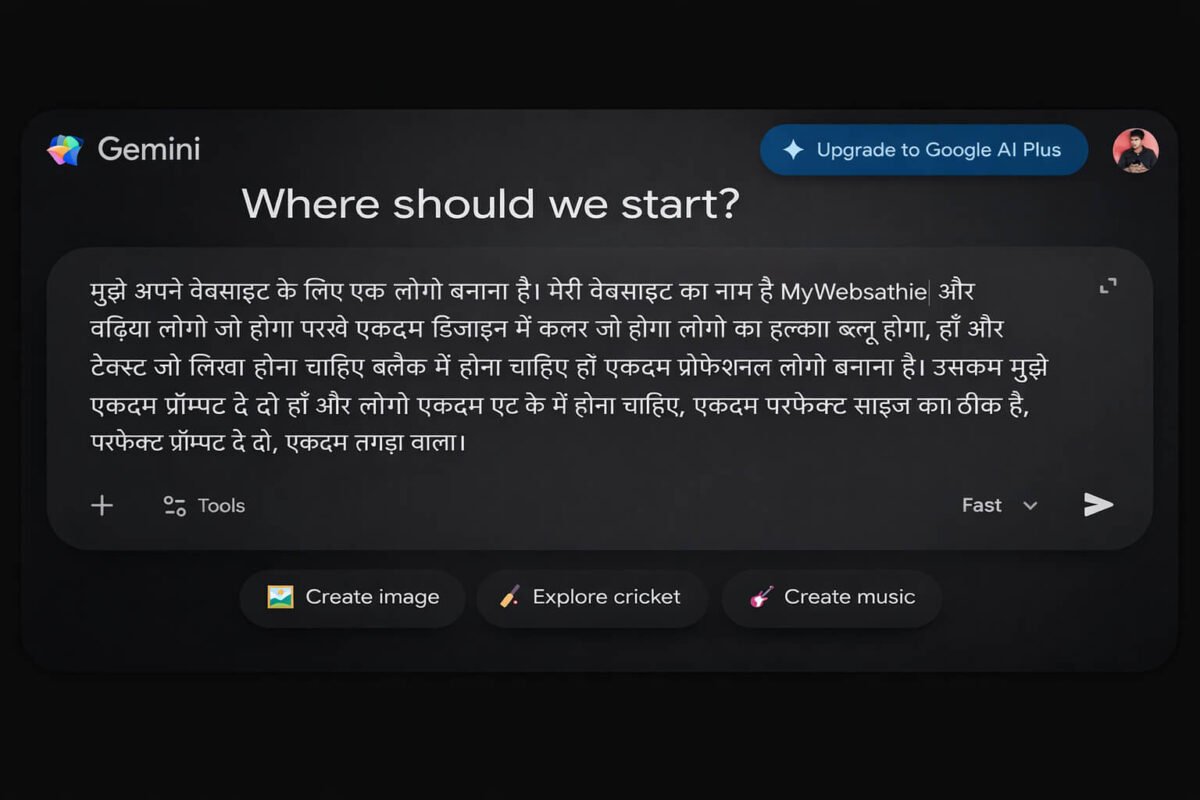
अगर आप अपने YouTube चैनल, वेबसाइट, WhatsApp चैनल या किसी छोटे business के लिए logo बनाना चाहते हैं, तो Google Gemini आपकी काफी मदद कर सकता है। इसके लिए आपको logo designing की बहुत ज्यादा जानकारी होना भी जरूरी नहीं है। बस आपको Gemini को साफ तरीके से समझाना है कि आपका logo कैसा दिखना चाहिए।
Gemini को अपने logo का नाम, पसंदीदा color, background, design style, symbol और जरूरी details बताएं। आप यह भी बता सकते हैं कि logo modern, minimal, premium या professional दिखना चाहिए। जितनी साफ जानकारी देंगे, Gemini के लिए आपकी जरूरत के अनुसार logo prompt तैयार करना उतना ही आसान होगा।
इसके बाद Gemini आपकी दी गई जानकारी के आधार पर एक ready-to-use logo prompt तैयार कर सकता है। आप उस prompt को copy करके इस्तेमाल कर सकते हैं और जरूरत पड़ने पर उसमें अपनी पसंद के अनुसार बदलाव भी कर सकते हैं। नीचे इसका एक आसान example दिया गया है, जिससे आपको पूरा तरीका और साफ समझ आ जाएगा।
Step 2: Gemini aapke liye automatically perfect prompt generate kar dega
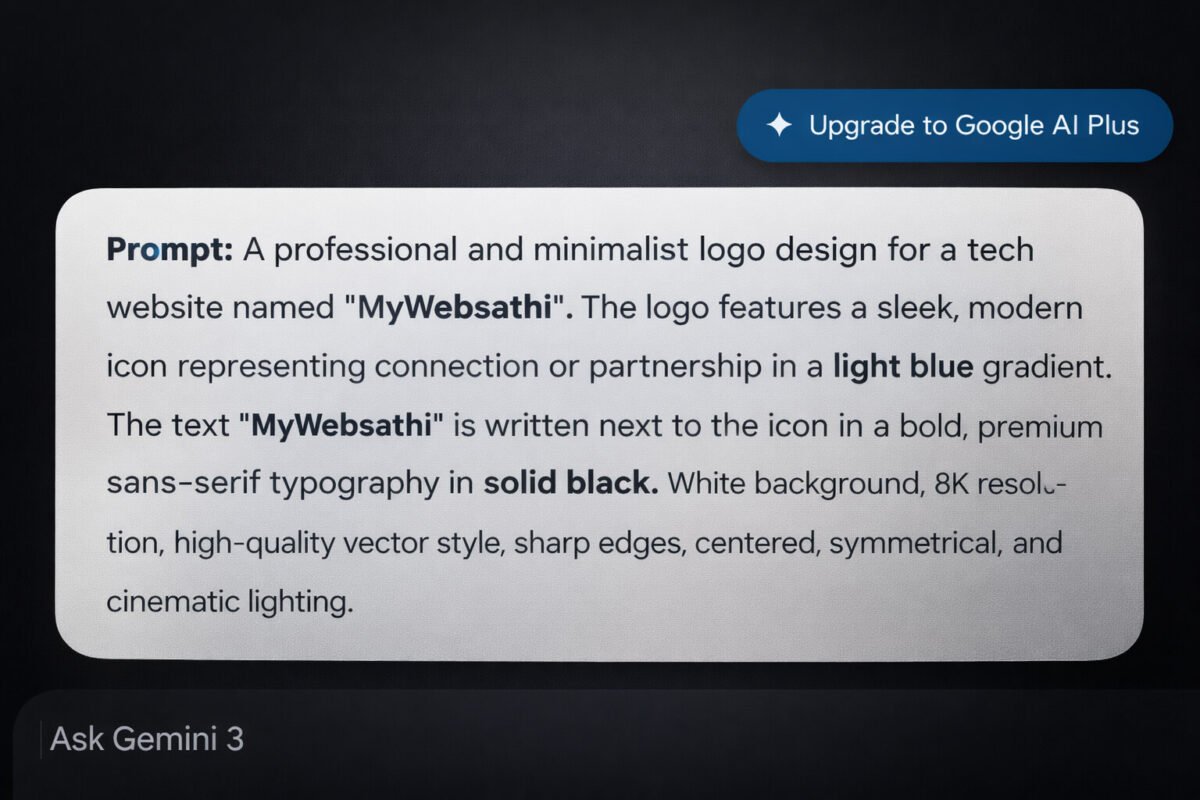
जैसे ही आप अपनी जरूरत की जानकारी लिखकर Send करते हैं, Gemini उन details के आधार पर आपके लिए एक ready-to-use logo prompt तैयार कर देता है। Prompt मिलने के बाद उसे एक बार ध्यान से पढ़ें और देखें कि logo का नाम, color, style, background और बाकी जरूरी details सही तरीके से शामिल हुई हैं या नहीं।
इसके बाद prompt को Copy करके logo बनाने के लिए इस्तेमाल कर सकते हैं। अगर पहला result आपकी पसंद के अनुसार न आए, तो उसी prompt में color, design, symbol या style जैसी details बदलकर दोबारा कोशिश करें। इससे आपको अपनी जरूरत के अनुसार logo तैयार करने में आसानी होगी।
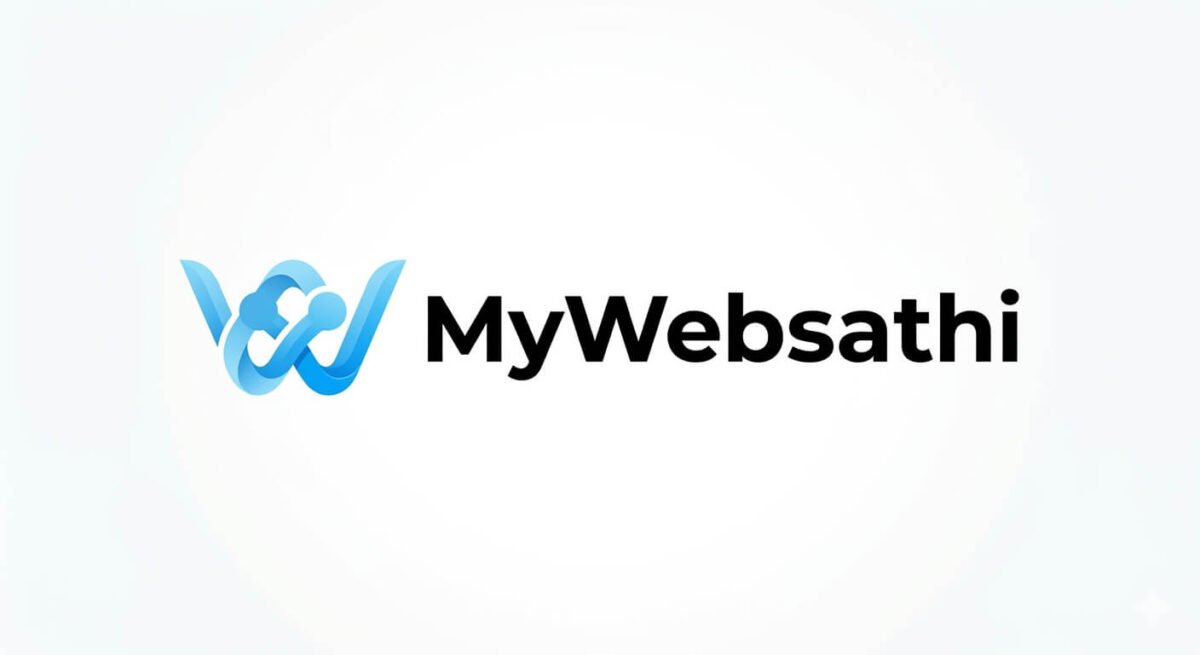
नीचे दिए गए उदाहरण में आप देख सकते हैं कि इसी prompt का इस्तेमाल करके प्रोफेशनल लोगो तैयार किया गया है।
Generate a clean, premium and professional vector logo for a technology website named “MyWebsathi”. Create a unique minimalist icon symbolizing digital connection, technology and partnership, using smoothly connected geometric lines or nodes in a modern light-blue to cyan gradient. Keep the icon simple, memorable and clearly recognizable even at small sizes.
Place the exact text “MyWebsathi” beside the icon in bold, modern premium sans-serif typography with clean spacing and solid deep black color. Use a pure white background with a balanced horizontal layout, precise alignment, generous negative space, crisp vector edges and subtle visual depth. The overall identity should feel trustworthy, modern and suitable for a professional technology website, social media profile and brand identity. High-resolution vector-style output, sharp details, clean geometry, no mockup, no unnecessary symbols, no extra text, no spelling errors, no watermark, no clutter, no 3D effect.
Generate a premium futuristic 3D technology logo for the brand name “MY Web Sathi”, featuring bold, chunky and highly readable modern typography with a refined brushed-metal finish, smooth beveled edges and realistic dimensional depth. Integrate a sleek AI digital-assistant symbol combined with subtle microchip circuitry beside or naturally connected to the lettering, representing technology, smart guidance and digital partnership without making the design cluttered.
Use a clean soft pastel-blue background with generous negative space and a balanced horizontal composition suitable for a website header and professional brand identity. Add restrained cyan-blue neon accents around selected edges and circuitry, keeping the glow subtle and premium rather than overly bright. Use soft studio lighting, realistic metallic reflections, gentle shadows and controlled highlights to create convincing 3D depth.
Keep the exact text “MY Web Sathi” perfectly spelled, sharp and easy to read. Ultra-high-resolution professional 3D branding render, crisp edges, strong contrast, symmetrical visual balance, modern tech aesthetic, no unnecessary objects, no extra text, no excessive neon glow, no distorted letters, no spelling errors, no watermark, and no cheap gaming-logo appearance.
Generate a modern, premium vector logo for a technology website named “MY Web Sathi”. Use thick, clean and futuristic sans-serif typography with strong readability, precise spacing and sharp geometric letterforms. Place a distinctive abstract AI network icon beside the brand name, created from interconnected nodes, fine circuit-like lines and subtle digital connections, giving the identity a smart technology and digital-partner feel.
Use a solid light sky-blue background with a clean, centered horizontal composition and generous spacing, suitable for a website header, social media and professional branding. Keep the design minimalist and memorable with subtle cyan highlights, crisp vector edges, balanced proportions and a polished flat-design finish. High-resolution, ultra-sharp vector quality, exact text “MY Web Sathi”, no spelling errors, no extra text, no clutter, no mockup, no excessive glow, no 3D effects, no watermark.
Generate a high-end professional flat vector logo for the technology brand “MyWebsathi”. Create a distinctive abstract icon inspired by a stylized “W” combined with subtle digital connection nodes, using a vibrant light-blue to cyan gradient. Keep the symbol geometric, simple, memorable, and clearly recognizable at both small and large sizes.
Place the exact brand name “MyWebsathi” underneath the icon in elegant, bold black sans-serif typography with clean spacing and perfect alignment. Use a pure white background, centered composition, balanced proportions, generous negative space, crisp vector edges, and a refined modern tech aesthetic. Premium branding quality, ultra-sharp high-resolution output, flat design, no 3D effect, no mockup, no unnecessary symbols, no extra text, no spelling errors, no watermark, and no visual clutter.
Gemini se Thumbnail Banane ka Prompt Kaise Likhen (Step-by-Step Guide)
Step 1: Gemini me Thumbnail Banane ke Liye Prompt Kaise Likhen
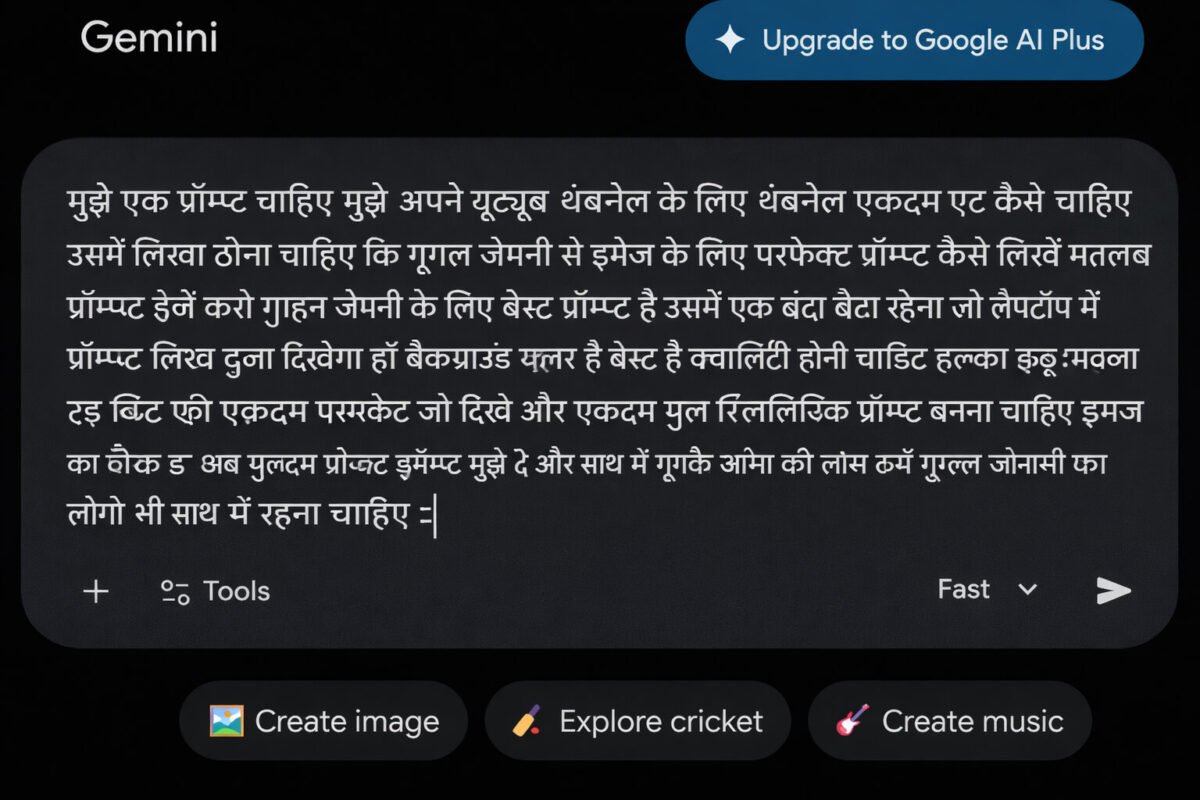
इस step में हम समझेंगे कि YouTube thumbnail बनाने के लिए prompt कैसे लिखें। तरीका लगभग वही है जो आपने ऊपर के steps में देखा है, लेकिन यहाँ Gemini को thumbnail से जुड़ी जरूरी जानकारी देनी होती है।
मान लीजिए आपको “मोबाइल का स्टोरेज कैसे बढ़ाएं” विषय पर YouTube thumbnail बनाना है। इसके लिए Gemini को बताएं कि thumbnail पर कौन-सा text चाहिए, background और colors कैसे हों, किसी व्यक्ति या mobile की image रखनी है या नहीं, और पूरा design किस तरह का दिखना चाहिए।
इन details के आधार पर Gemini आपके लिए एक ready-to-use YouTube thumbnail prompt तैयार कर सकता है। इसके बाद आप prompt को देखकर जरूरत के अनुसार बदलाव कर सकते हैं और उसे thumbnail बनाने के लिए इस्तेमाल कर सकते हैं। अगले step में हम इसी का example देखेंगे।
Step 2: Gemini aapke liye automatically ek ready-to-use prompt taiyaar kar dega
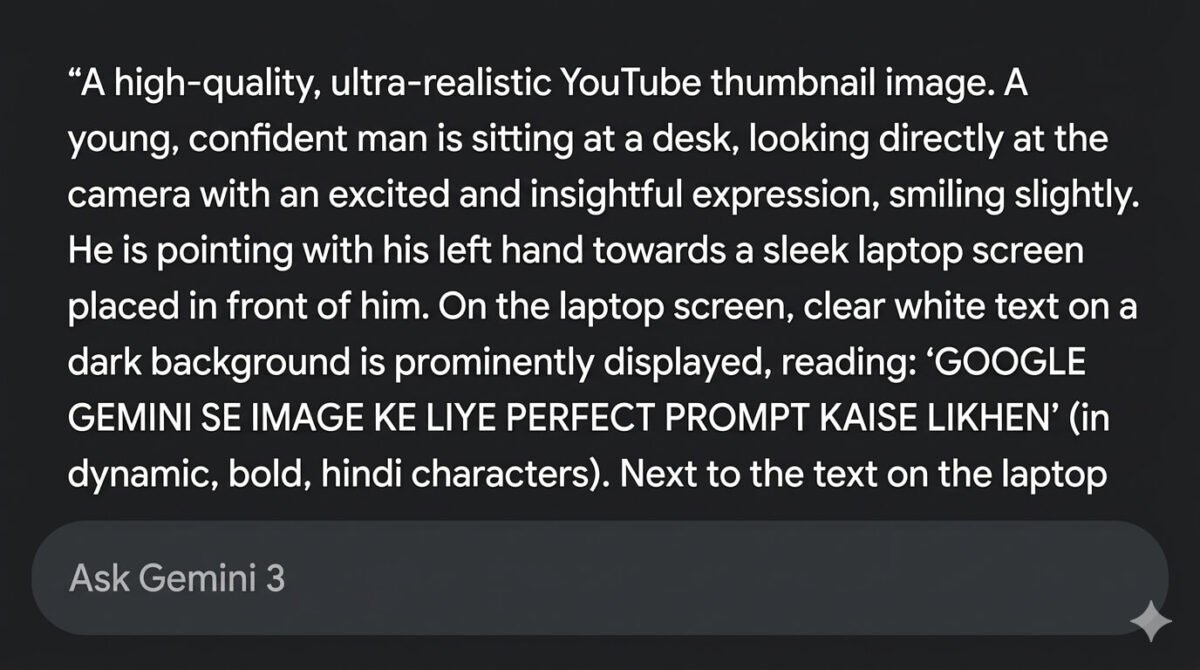
जैसे ही आप YouTube thumbnail से जुड़ी पूरी जानकारी लिखकर Send करते हैं, Gemini आपकी दी गई details के आधार पर एक ready-to-use prompt तैयार कर देता है। Prompt मिलने के बाद उसे एक बार ध्यान से देखें कि उसमें thumbnail का text, background, colors, image और बाकी जरूरी चीजें सही तरीके से शामिल हैं या नहीं।
इसके बाद उस prompt को Copy करके thumbnail बनाने के लिए इस्तेमाल कर सकते हैं। अगर पहली बार में design आपकी पसंद के अनुसार न बने, तो उसी prompt में जरूरी बदलाव करके दोबारा कोशिश करें। इस तरह आप अपने वीडियो के विषय के अनुसार एक साफ और आकर्षक thumbnail तैयार कर सकते हैं।
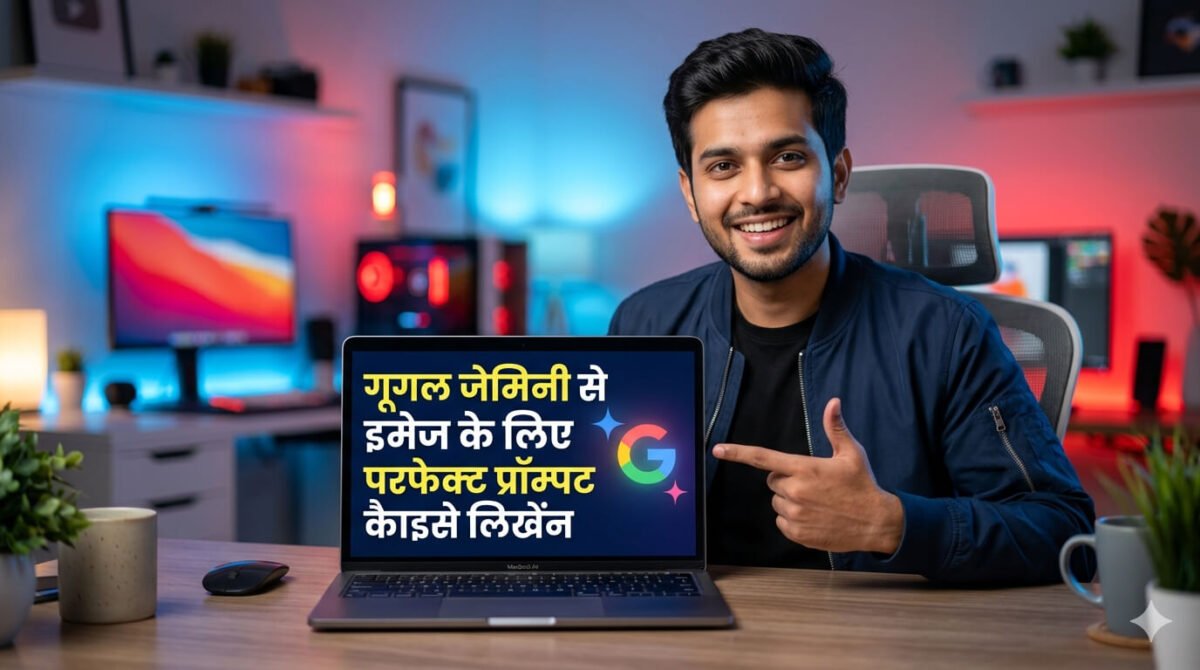
नीचे दिए गए prompt को कॉपी करके आप बिल्कुल इसी तरह का thumbnail आसानी से बना सकते हैं। अब आप अपने topic के हिसाब से उसमें बदलाव करें और नया prompt तैयार करके अपना thumbnail बना लें। बस इतना सा काम है, process वही रहेगा।
Generate a high-impact, ultra-realistic professional YouTube thumbnail in 16:9, 1280×720 resolution. Show a confident young man seated at a modern desk, wearing a stylish dark jacket, looking directly at the camera with an energetic, slightly smiling expression. He points naturally with his left hand toward a sleek open laptop beside him.
On the laptop screen, display large, bold, highly readable text: “GOOGLE GEMINI SE IMAGE KE LIYE PERFECT PROMPT KAISE LIKHEN”, arranged cleanly for maximum visibility, with a small colorful Gemini-style AI icon beside it. Keep the screen sharp, uncluttered and easy to understand even at thumbnail size.
Create a premium modern tech workspace in the background with strong depth and soft bokeh, blending electric-blue and warm ruby-red accent lighting. Use dramatic studio lighting on the man’s face with realistic skin texture, natural shadows, crisp hair details and subtle rim light for separation. Professional DSLR photography, sharp facial focus, vibrant but balanced colors, strong contrast and clean thumbnail composition with clear visual hierarchy. No blurry face, distorted hands, extra fingers, plastic skin, unreadable or misspelled text, clutter, watermark, or obvious AI artifacts.
Generate a high-impact, professional YouTube tech thumbnail in 16:9 (1200×675). Use a muted light-red background with a subtle futuristic circuit-board pattern, soft digital texture, and enough depth to feel premium without becoming distracting.
On the left side, place a modern smartphone at a slight dynamic angle showing a clear “Storage Full” warning with a red storage/progress bar nearly filled, visually suggesting low storage and slow performance. Add subtle screen reflections and realistic device details.
On the right side, show an expressive young Indian man with a surprised yet confident look, naturally pointing toward the center text area. Keep realistic skin texture, detailed hair, accurate hands and fingers, and clean professional lighting with subtle rim light.
Place large, bold, highly readable Hindi text in the center: “अपने फोन का स्टोरेज कैसे बढ़ाएं”. Use strong visual hierarchy, clean spacing, high contrast, and make the key words stand out clearly even on a small mobile screen. Ultra-sharp 4K-style detail, vibrant but balanced colors, professional tech-channel aesthetic, no clutter, no distorted face or hands, no extra fingers, no misspelled text, no watermark, and no obvious AI artifacts.

Prompt likhte samay dhyan rakhne wali zaroori baatein
जब आप prompt लिखते हैं, तो थोड़ा सा ध्यान रखने से आपका result काफी बेहतर हो जाता है। नीचे कुछ simple और काम की बातें दी हैं, जिन्हें follow करके आप हमेशा अच्छा output पा सकते हैं।
• Prompt साफ और आसान रखें
Prompt हमेशा सीधे और आसान शब्दों में लिखें, ताकि Gemini आपकी बात आसानी से समझ सके। एक ही बात को घुमा-फिराकर या कई अलग तरीकों से लिखने की जरूरत नहीं है।
• जरूरी Details जरूर दें
आप कैसी image चाहते हैं, उसकी जरूरी जानकारी prompt में शामिल करें। जैसे background, कपड़े, pose, colors, lighting, location और image style। इससे Gemini को आपकी जरूरत समझने में आसानी होती है।
• Image का Style बताएं
अगर आपको किसी खास तरह की image चाहिए, तो उसका style भी लिखें। उदाहरण के लिए realistic, cinematic, professional DSLR, cartoon या 3D जैसे शब्द इस्तेमाल किए जा सकते हैं।
• Prompt छोटा लेकिन पूरा रखें
सिर्फ prompt को बड़ा बनाने के लिए बेकार की details जोड़ने की जरूरत नहीं है। कोशिश करें कि prompt में केवल वही बातें रहें जो final image के लिए जरूरी हैं। इससे prompt पढ़ना और copy करना भी आसान रहता है।
• Result देखकर Prompt में बदलाव करें
पहली बार में image आपकी पसंद के अनुसार न बने तो पूरा prompt दोबारा लिखने की जरूरत नहीं है। जिस चीज में समस्या है, जैसे face, background, pose या lighting, उसी से जुड़ी detail बदलकर फिर से image बनाएं।
• Negative Instructions भी जोड़ें
अगर आप image में कुछ गलतियां नहीं चाहते, तो prompt के आखिर में उसकी जानकारी दे सकते हैं। जैसे no blur, no distorted face, no extra fingers, no watermark, no text आदि। इससे आम AI image errors को कम करने में मदद मिल सकती है।
निष्कर्ष
उम्मीद है अब आपको समझ आ गया होगा कि Google Gemini से photo बनाने का prompt कैसे लिखें और अपनी जरूरत के अनुसार उसमें क्या-क्या जानकारी शामिल करें। चाहे आपको personal photo बनानी हो, दो photos को एक frame में जोड़ना हो, logo तैयार करना हो या YouTube thumbnail बनाना हो, सही तरीका लगभग एक जैसा ही रहता है।
बस Gemini को साफ शब्दों में बताएं कि आपको कैसी image चाहिए और उसमें कौन-कौन सी जरूरी चीजें होनी चाहिए। इसके बाद तैयार prompt को अपनी जरूरत के अनुसार थोड़ा edit करके इस्तेमाल कर सकते हैं। शुरुआत में कुछ results आपकी पसंद के अनुसार न भी आएं, तो छोटे बदलाव करते रहें; धीरे-धीरे आपको खुद अच्छे prompts लिखने का तरीका समझ आने लगेगा।ChatGPT Kya Hai (2026) ChatGPT Kaise Kaam Karta Hai – Puri Jankari Hindi Me
Aksar Puche Jane Wale Sawal (FAQ)
Gemini से फोटो कैसे बनाएं?
Google Gemini से फोटो बनाने के लिए Gemini खोलें और prompt box में लिखें कि आपको कैसी फोटो चाहिए। इसमें subject, background, कपड़े, pose, lighting और image style जैसी जरूरी जानकारी दे सकते हैं। इसके बाद prompt को Send करें और Gemini आपकी दी गई जानकारी के आधार पर image तैयार कर देगा।
Google Gemini prompt का उपयोग कैसे करें?
Google Gemini prompt का उपयोग करने के लिए पहले Gemini खोलें और prompt box में अपना तैयार prompt paste करें। अगर आप अपनी personal photo पर काम कर रहे हैं, तो photo भी upload करें और फिर prompt को Send कर दें। इसके बाद Gemini आपकी दी गई जानकारी के आधार पर image तैयार करेगा, जिसे जरूरत के अनुसार prompt में बदलाव करके दोबारा भी बनाया जा सकता है।
AI से फोटो कैसे बनाएं?
AI से फोटो बनाने के लिए किसी AI image generator में अपनी पसंद की फोटो का साफ और पूरा prompt लिखें। Prompt में subject, background, कपड़े, pose, lighting और image style जैसी जरूरी जानकारी दें। इसके बाद prompt को Send करें और AI आपकी दी गई जानकारी के आधार पर फोटो तैयार कर देगा।
नंबर वन फोटो एडिटर ऐप कौन सा है?
फोटो एडिटिंग के लिए Adobe Lightroom और Snapseed सबसे लोकप्रिय ऐप्स में गिने जाते हैं। Lightroom professional color और lighting editing के लिए अच्छा है, जबकि Snapseed आसान और free photo editing के लिए बेहतर विकल्प है।
Gemini AI photo prompt कॉपी-पेस्ट कैसे करें?
Gemini AI photo prompt कॉपी-पेस्ट करने के लिए पहले अपनी पसंद का prompt Copy करें और Google Gemini के prompt box में Paste कर दें। अगर prompt किसी personal photo के लिए है, तो अपनी photo भी upload करें। इसके बाद Send करें और Gemini prompt में दी गई जानकारी के आधार पर image तैयार करेगा।
AI से फोटो एडिटिंग कैसे करें?
AI फोटो एडिटिंग के लिए आपको टूल में यह बताना होता है कि फोटो में क्या बदलाव चाहिए—जैसे बैकग्राउंड, कलर या स्टाइल। सही निर्देश देने पर AI अपने आप फोटो को एडिट करके नया लुक दे देता है।
फोटो बनाने वाला Google टूल कौन सा है?
फोटो बनाने के लिए Google का Gemini AI इस्तेमाल किया जा सकता है। इसमें आप अपनी जरूरत के अनुसार prompt लिखकर नई AI images बना सकते हैं और कई मामलों में uploaded photo के साथ बदलाव भी कर सकते हैं।
Google Gemini क्या है?
Google Gemini एक AI आधारित टूल है जो टेक्स्ट, इमेज और कई तरह के डिजिटल कामों में मदद करता है। इसकी मदद से आप सही prompt देकर फोटो, लोगो और अन्य डिज़ाइन आसानी से तैयार कर सकते हैं।
Gemini से AI फोटो कैसे बनाएं?
Gemini से AI फोटो बनाने के लिए पहले आपको उसे साफ और पूरी जानकारी के साथ prompt देना होता है। जैसे ही आप सही विवरण देते हैं, Gemini आपके लिए एक usable prompt तैयार कर देता है, जिसे इस्तेमाल करके आप आसानी से AI इमेज बना सकते हैं।
Google Gemini और ChatGPT में कौन सा अच्छा है?
Google Gemini और ChatGPT दोनों ही अच्छे AI tools हैं, लेकिन दोनों की अपनी खूबियां हैं। Gemini, Google की सेवाओं के साथ काम करने और AI images जैसे कामों के लिए उपयोगी है, जबकि ChatGPT writing, ideas, coding और किसी विषय को विस्तार से समझने जैसे कामों में काफी उपयोगी है। इसलिए कौन सा बेहतर है, यह इस बात पर निर्भर करता है कि आपको AI का इस्तेमाल किस काम के लिए करना है।
Leave a Reply